Everything a music school runs on.
Thirteen capabilities, one at a time, with the real screen beside each. If you arrived here looking for one of them, the list below goes straight to it.
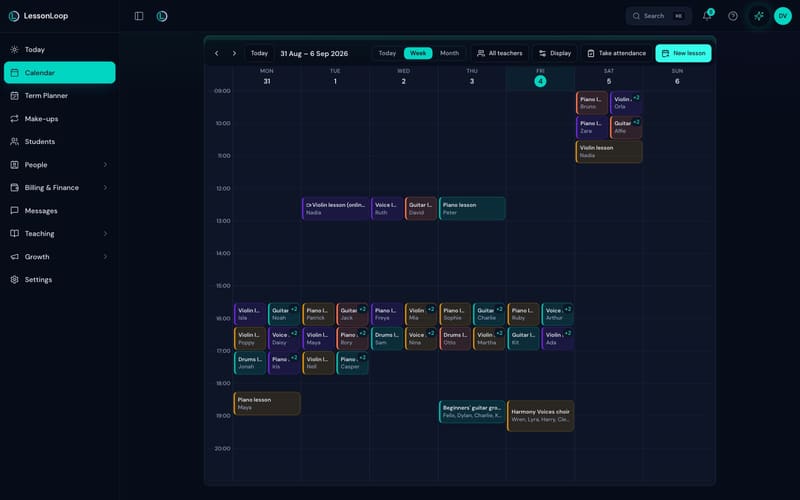
Teacher lanes, rooms and sites on one grid.
Week, day and month views across every location, filtered to one teacher or all of them, with clashes checked on teacher, room and pupil as you book rather than after a parent finds out.
- ✓ Recurrence beyond weekly, and substitutes without rebuilding a term
- ✓ Group lessons, ensembles and choirs beside one-to-one teaching
- ✓ Teaching availability, time off and closure dates respected automatically
- ✓ Online lessons with their own link; a busy overlay from each teacher’s Google Calendar
- ✓ The Term Planner rolls a whole term forward — same child, same slot — in one review pass
For a whole staff, that argument is made on music school software.
One mark, and the lesson is finished with.
Present, absent, late or cancelled, each saving on its own — no separate save step. That single mark feeds the invoice, the make-up credit and the teacher’s pay, so nothing is entered twice.
- ✓ Absence reasons carrying your own rules: whether a credit is earned, whether the slot is released, and a per-term cap
- ✓ Credits valued from the rate card, so a credit is worth what the missed lesson cost, and expiring on your schedule
- ✓ School registers for lessons with no fixed clock time, grouped per site, per teacher, per day, in a running order you can reorder
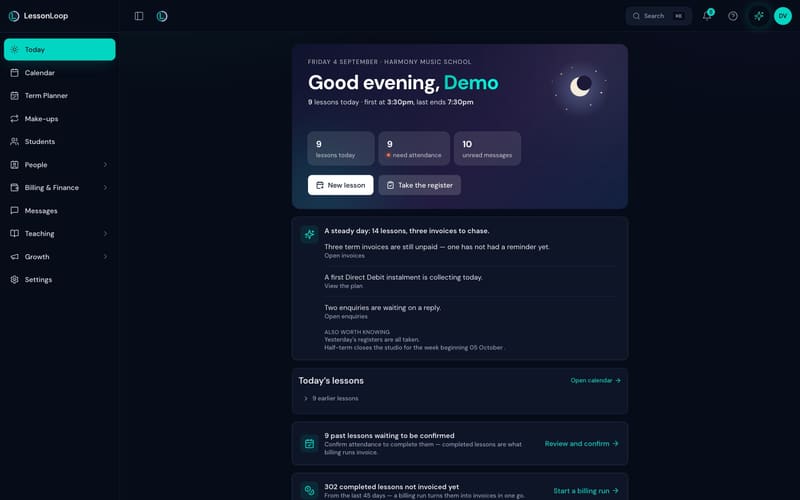
- ✓ An unconfirmed queue on the Today screen — a term is never invoiced from a lesson nobody marked
- ✓ Closures applied across every teacher at once, with the affected families told in the same pass
Write the policy first with the free make-up policy generator.
Siblings under one household, not four records.
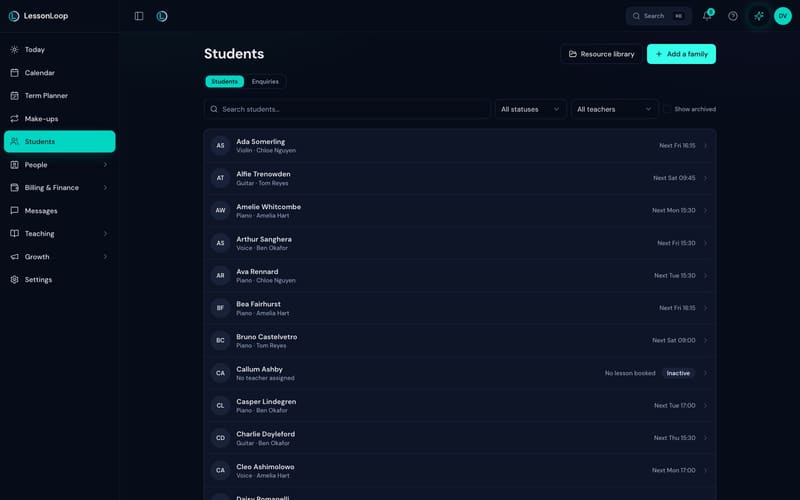
Pupils, guardians and teachers linked the way real families work — so three children on four instruments produce one account, one statement and one conversation.
- ✓ Instruments, grades and lesson notes on every pupil, in your school’s own vocabulary
- ✓ Guardians with their own portal access, contact preferences and recorded consent
- ✓ Enquiries tracked from first contact to first lesson, with the source they came from
- ✓ Every destructive change written to an audit log, with who did it and when
- ✓ Two-factor authentication for every account, with recovery codes — and owners can require it for all staff
- ✓ Starts small on purpose: tools arrive as your studio grows, and the Grow page shows what unlocks next — with an unlock-early switch for anything you want today
- ✓ Studio news: write a notice once and every family sees it on their portal Home, with one button to send it to everyone by email when you want them told
- ✓ Reviews from families: after eight lessons a family is invited to review their teacher; you approve every one, and the ones you feature go on your booking page — with a rating once three are featured
- ✓ Lending Library: the register of studio property on loan — lend at the lesson from the pupil’s page, families see it on their portal and are reminded before it’s due, and it comes back with its condition noted
- ✓ Full CSV export of everything, at any time, on every plan
Four roles, and a rate that follows the lesson.
Unlimited teacher accounts on the School plan, because charging for a hire is charging for growth. What each person can open is decided by their role, not by trust.
Who sees what
An owner sees everything. An administrator runs the school without owner-only finance. A teacher sees their own timetable, pupils and notes. A finance account works the invoices and the ledger without the family conversations.
Pay rates
Per lesson, hourly or as a percentage — set per teacher and per instrument. A substitute is paid for the lesson they actually taught, not the one on the original timetable.
Sites and rooms
Every lesson carries a location and a room. Visiting teachers, hired halls and partner schools all sit on the same grid, and clash checks cover rooms as well as people.
A billing run you can read before it exists.
A run gathers every completed lesson since the last one, previews exactly what it will produce, and only then creates the invoices. Nothing reaches a parent by surprise.
- ✓ Rate cards by instrument, subject, lesson length, teacher or pupil
- ✓ Termly, half-termly, monthly or per lesson; VAT-aware, sent from your own domain
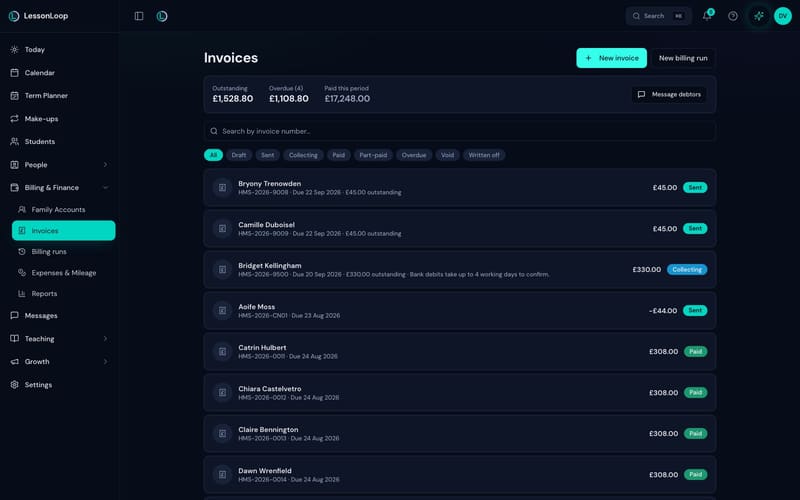
- ✓ Eight statuses that mean something: draft, sent, collecting, paid, part-paid, overdue, void, written off
- ✓ Card payments and Bacs Direct Debit into your own Stripe account, with the mandate set up by the parent
- ✓ Payment plans, instalments, prepaid balances, part payments, refunds and credit notes
- ✓ Automatic late fees with a grace period and a cap, and a reminder ladder that pauses while a bank debit is in flight
- ✓ A one-way sync of invoices and payments into Xero — LessonLoop pushes, nothing comes back
The Bacs rail end to end is in Direct Debit for music lesson fees.
A statement that reconciles to the penny.
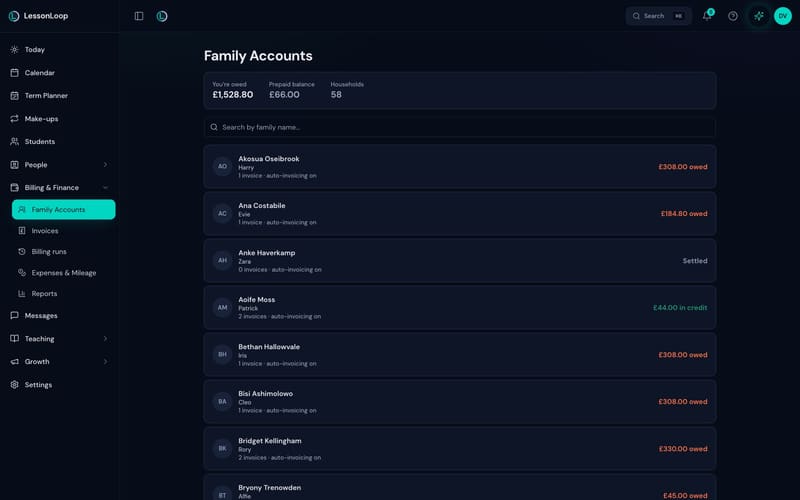
One running account per household: what was invoiced, what was paid, what is on credit and what is left. The number a parent sees is the number you see.
- ✓ Prepaid credit drawn down as lessons are taught
- ✓ Group lessons billed per pupil, not per booking
- ✓ Write-offs, refunds and credit notes recorded with an audit trail behind them
- ✓ Message a debtor straight from the ledger, with the amounts already in the draft
Your name on it, your domain, their questions answered.
Almost every out-of-hours message is one of three questions: when is the lesson, what do I owe, has it been paid. The portal answers all three, at your school’s own address.
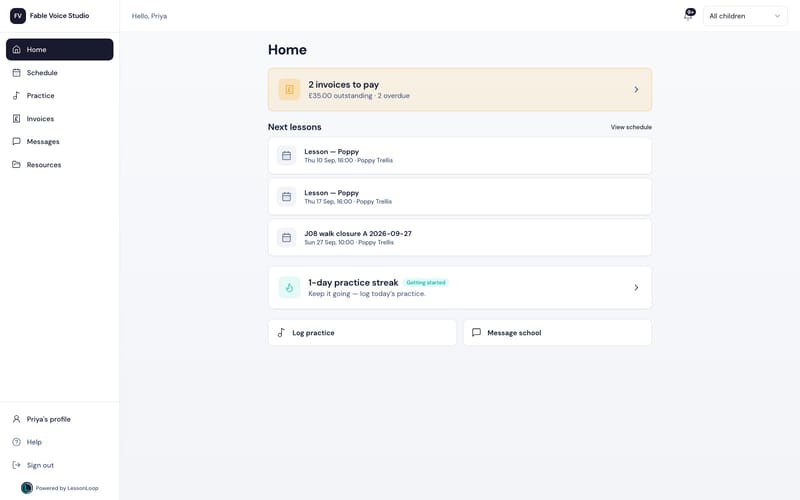
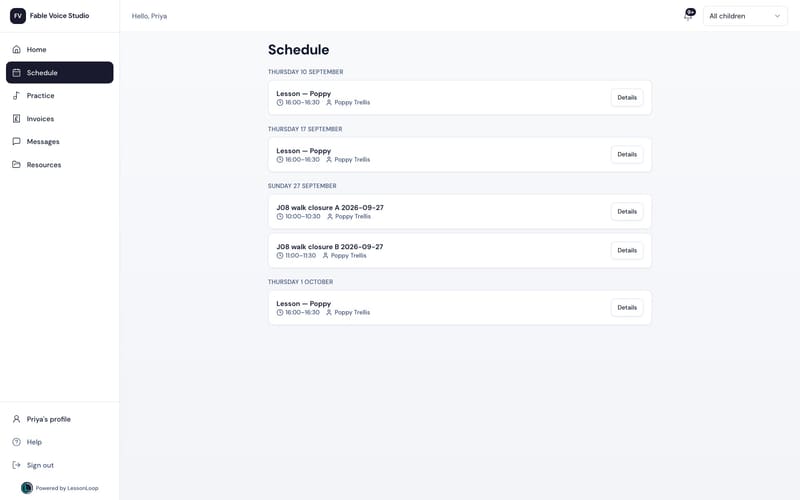
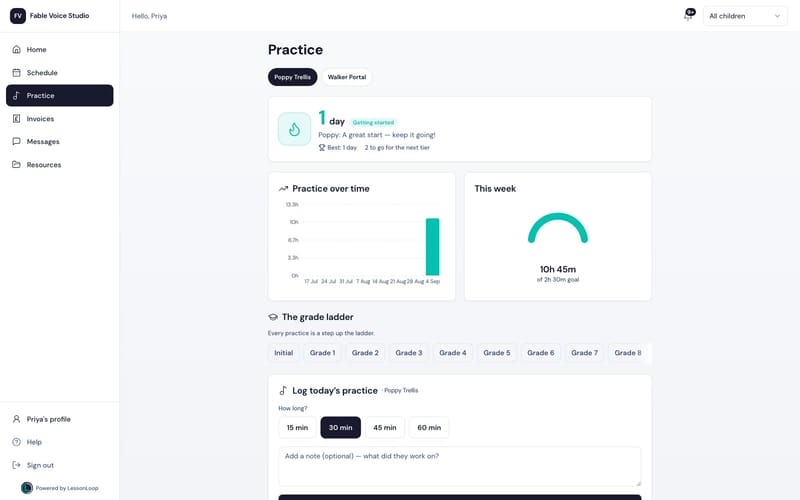
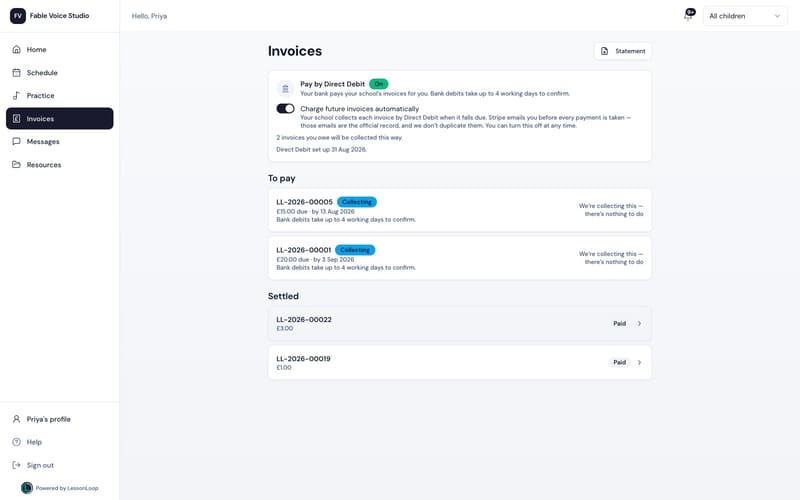
The portal runs on your own custom domain, in your own colours, and there is an iPhone app for it too.
One inbox instead of five.
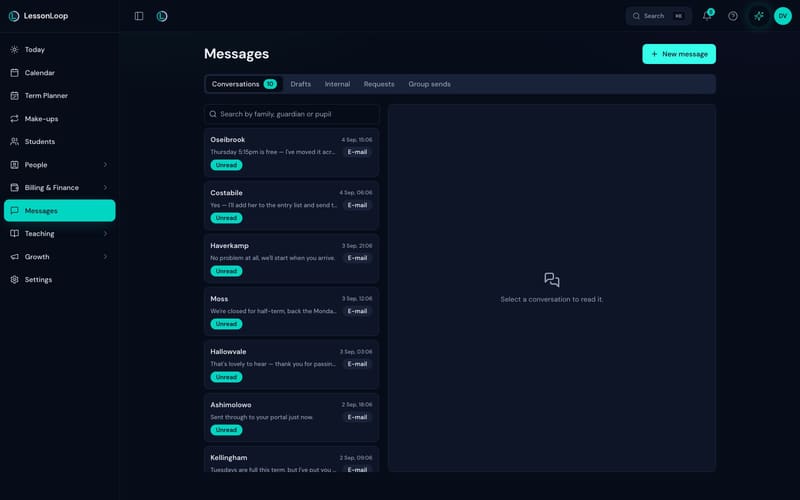
Reach one parent, a class or the whole school from your own address, and keep every reply in a single thread per family rather than scattered across a personal phone.
- ✓ Email sent from your own domain, with per-family delivery status
- ✓ Consent recorded per family and per channel, and respected on every send
- ✓ Bulk messages to a class, an instrument, a teacher’s pupils or everyone with a balance
- ✓ Message templates for the things you send every term
- ✓ Automatic lesson reminders that cut no-shows
- ✓ WhatsApp reminders and replies threaded here as an optional prepaid pack, currently in early access. There is no SMS channel.
Propose. Confirm. Execute.
The only AI that does the admin. Ask in plain English and it proposes the actual change — the invoice drafted, the lesson moved, the balance chased — then waits. Nothing runs on your school without a person saying yes.
The Morning Brief
What needs you today, at the top of the Today screen: the invoices still unpaid and which has not had a reminder, the Direct Debit instalment collecting, the enquiries waiting on a reply, the registers nobody took, and the closure landing next month.
Insight cards, and a written draft
What has drifted — attendance falling on a Tuesday, a family two terms behind — with the message already written for you to edit or send. Every action it takes is written to the audit log. LoopAssist is on both plans; School carries double the daily actions, and there is no separate AI tier to buy.
09 · Your studio, from ChatGPT and Claude
Paste the connector URL into ChatGPT, Claude or any MCP client, sign in with your LessonLoop account, and ask your own studio questions — “who hasn’t paid this term?”, “how many lessons did Amelia teach?” — without opening a dashboard.
 ChatGPT
  Claude + any MCP client
 Scoped, revocable, logged
The connector reads; it does not change anything. Public API keys are read-only, scoped and rate-limited, any connection can be revoked from Settings, and every connection and action is logged. Stripe, Xero and Google Calendar are set up the same way — every integration, in detail.
Thirteen reports, one source.
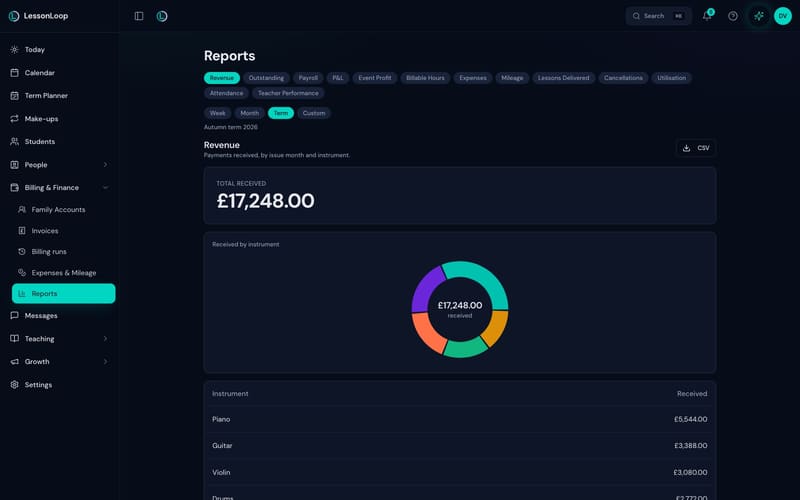
Revenue, outstanding, payroll, P&L, event profit, billable hours, expenses, mileage, lessons delivered, cancellations, utilisation, attendance and teacher performance — all built from lessons that actually happened, so they reconcile to the same register.
- ✓ By week, month, term or a custom range, each one a click from a CSV
- ✓ Payroll on effective hours, attributing every lesson to whoever taught it
- ✓ Expenses and mileage on the UK tax year at HMRC rates
- ✓ Revenue broken down by instrument, teacher and month
What the admin behind those numbers is costing you: the admin cost calculator.
What every pupil is working on.
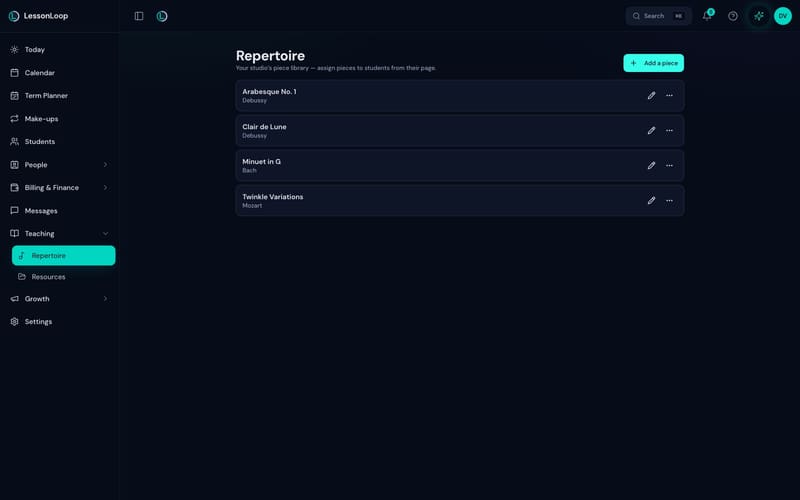
A piece catalogue for the school and a per-pupil journey through it — assigned, in progress, polished, performed — so “what did we do last week” has an answer that is not a notebook.
- ✓ Your studio’s own piece library, assigned to a pupil from their page
- ✓ ABRSM and Trinity-friendly grade levels, configurable to your own wording
- ✓ A shared resource library: upload sheet music, backing tracks and handouts once and share them with the pupils who need them
- ✓ Resources appear in the parent portal, so practice material is where the family already looks
New pupils arrive without an email thread.
A public booking page and an embeddable widget put your real availability on your own website, so an enquiry becomes a first lesson without four messages and a diary check.
Public booking pages
Real open slots under your own policy, on your own custom domain, protected against bot signups. Approve a request or let it book itself.
An embeddable enquiry widget
Drop it into your existing website. Enquiries land in LessonLoop with the source they came from, and are tracked to a first lesson.
Open classes
Publish a workshop, a masterclass or a holiday course with its own places and price, and let families book straight into it.
The register in your pocket.
A native app on the App Store — not a website in a shortcut — for the two moments that happen away from a desk: marking a register between pupils, and a parent checking a lesson time on the way out of the door.
For teachers
Today’s lessons, the register, pupil notes and messages. Mark attendance in two taps while the next child unpacks.
For parents
Schedule, invoices with a pay button, messages and practice logging — the portal, on a phone, under your school’s branding.
Everywhere else
The web app runs the whole product on any device. The iPhone app is included on both plans at no extra cost.

Same spine, four sizes of studio.
The whole product is on every plan; the plans differ on teacher accounts, not on capability.
Music teacher software is this product for one teacher, at £15 a month with unlimited pupils. Music school software is the same product for a team, at £39 a month with unlimited teacher accounts. Multi-site academies, performing arts, drama and dance schools each get their own page — all six are on who LessonLoop is for. The line-by-line plan table is on pricing.
The specifics, answered.
Can I bring my data from another tool?
Do you handle group lessons and ensembles?
What can the AI connector actually see?
How do teachers get paid through it?
Is it really UK-native?
What is deliberately not in the product?
Open all thirteen on your own studio.
30-day free trial. No card. Cancel any time — and we import your data, free.